GPT Image 2.6 Sunburst API
GPT Image 2.6 (released November 4, 2026). New in 2.6: the complexity setting, animated GIF and SVG output, and markup-guided edits (see the section below). What's new and how it compares with 2.5: GPT Image 2.6 API.
New accounts start with a $0 balance — top up before your first request. Top up from $5. If a request returns 402 (400 on the OpenAI format) with "wallet balance is insufficient", your balance is empty — your base URL and key are fine. Top up and retry.
Endpoints and authentication
Moyi API uses the OpenAI Images API compatible format:
- Generate images:
POST https://api.moyi-api.com/v1/images/generations - Edit images:
POST https://api.moyi-api.com/v1/images/edits
Request headers:
Authorization: Bearer sk-xxxxxx
Content-Type: application/json
The edit endpoint also accepts multipart/form-data for uploading image files.
Generate images
Minimal request:
curl https://api.moyi-api.com/v1/images/generations \
  -H "Authorization: Bearer sk-xxxxxx" \
  -H "Content-Type: application/json" \
  -d '{
    "model": "gpt-image-2.6-sunburst",
    "prompt": "An orange tabby cat typing on a keyboard, illustration style"
  }'
Specify size and quality:
{
  "model": "gpt-image-2.6-sunburst",
  "prompt": "An orange tabby cat typing on a keyboard, illustration style",
  "size": "2048x2048",
  "quality": "high"
}
Common parameters:
| Parameter | Description |
|---|---|
model |
Use gpt-image-2.6-sunburst. It must be specified explicitly; when model is omitted, gpt-image-2 is used by default. |
prompt |
Description of the image to generate. |
size |
auto or widthxheight, for example 1024x1024, 2048x2048, 3840x2160. |
quality |
low, medium, high, or auto. |
n |
Number of images to generate per request. Defaults to 1. |
output_format |
png, jpeg, or webp; on GPT Image 2.6 also gif or svg (see below). |
output_compression |
JPEG/WebP compression level, 0 to 100. |
background |
transparent, opaque, or auto. With transparent, the returned image has an alpha channel; pair it with output_format set to png or webp. |
moderation |
Content moderation strictness, low or auto. |
stream |
Set to true to stream the response over SSE: intermediate chunks have object set to image.generation.chunk, the final chunk has object set to image.generation.result with the result image in data[0].b64_json, followed by data: [DONE]. |
partial_images |
0 to 3. |
user |
A caller-defined end-user identifier, passed through as is. |
Size limits OpenAI publishes for GPT Image 2.5 (we'll update this page if 2.6 differs): the longest side must not exceed 3840 pixels; width and height must both be multiples of 16; the aspect ratio must not exceed 3:1; and the total pixel count must be between 655,360 and 8,294,400. Sizes are pixel dimensions, not fixed 1k, 2k, 4k strings.
Edit images
curl https://api.moyi-api.com/v1/images/edits \
  -H "Authorization: Bearer sk-xxxxxx" \
  -F "model=gpt-image-2.6-sunburst" \
  -F "prompt=Replace the background with snowy mountains" \
  -F "image=@input.png" \
  -F "size=1024x1024"
Common parameters:
| Parameter | Description |
|---|---|
model |
Use gpt-image-2.6-sunburst. |
image |
The source image file. |
mask |
Mask image file; transparent areas are editable. Must match the source image size. |
markup |
GPT Image 2.6: a transparent overlay that circles or marks the area to change; describe the change in prompt. |
prompt |
The edit instruction. |
n |
Number of images to generate per request. Defaults to 1. |
size |
auto or widthxheight. |
quality |
low, medium, high, or auto. |
background |
transparent, opaque, or auto. |
input_fidelity |
How faithfully to preserve details of the source image, high or low. |
output_format |
png, jpeg, or webp. |
output_compression |
JPEG/WebP compression level, 0 to 100. |
stream |
Set to true to stream the response over SSE. The event format is the same as for image generation. |
partial_images |
0 to 3. |
user |
A caller-defined end-user identifier, passed through as is. |
New in GPT Image 2.6
From OpenAI's image generation guide:
| Parameter | Endpoint | Values |
|---|---|---|
complexity |
generations, edits | low, medium or high (default high): how much the model plans before rendering. Lower suits focused edits; higher helps with dense text and complex layouts but can be slower. Separate from quality, no extra fee. |
output_format: "gif" |
generations only | Animated GIF. frame_count 2–64 (default 9); frame_duration_ms 20–2000 (default 200); size is per frame, auto or multiples of 16. |
output_format: "svg" |
generations only | Vector SVG. Requires n: 1; no streaming, partial images or output_compression. |
markup |
edits only | A transparent overlay that marks the area to change. |
Animated GIF example:
curl https://api.moyi-api.com/v1/images/generations \
  -H "Authorization: Bearer sk-xxxxxx" \
  -H "Content-Type: application/json" \
  -d '{
    "model": "gpt-image-2.6-sunburst",
    "prompt": "A pixel-art fox waving, looping back to the first pose",
    "output_format": "gif",
    "frame_count": 12,
    "frame_duration_ms": 120
  }'
Decode data[0].b64_json as Base64 and save it with a .gif (or .svg) extension.
Size and billing rules
Image generation is billed per image. Each image's unit price is determined by its actual resolution, in three tiers by the longest side:
| Longest side of the output image | Tier |
|---|---|
| Up to 1024 | 1K |
| Up to 2048 | 2K |
| Above 2048 | 4K |
The tier is decided by the actual width and height of the returned image, not by the request parameters. When size is auto, omitted, or empty, billing follows the size the model actually outputs. Pass size explicitly if you need a fixed tier. See live pricing for the three tier prices.
FAQ
Codex says the image generation service is unavailable or cannot connect?
With its default permissions, Codex restricts network access, so the image request is blocked. Turn on Full access, then generate the image again.
Click the permissions button at the bottom-left of the Codex input box and choose Full access.
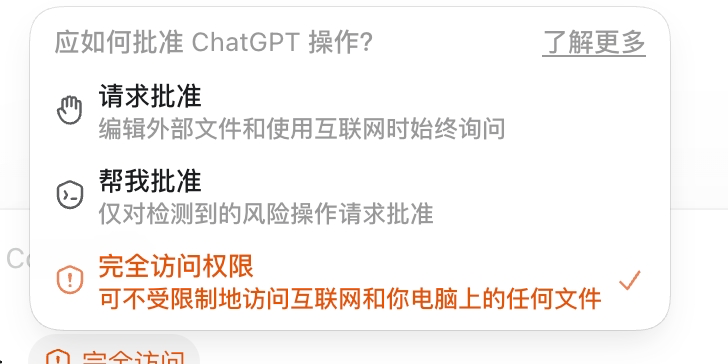
If Full access is not in that menu, click the gear icon at the bottom-left of the window, open Settings → General → Permissions, turn on Full access, and then choose it from the input box as described above.
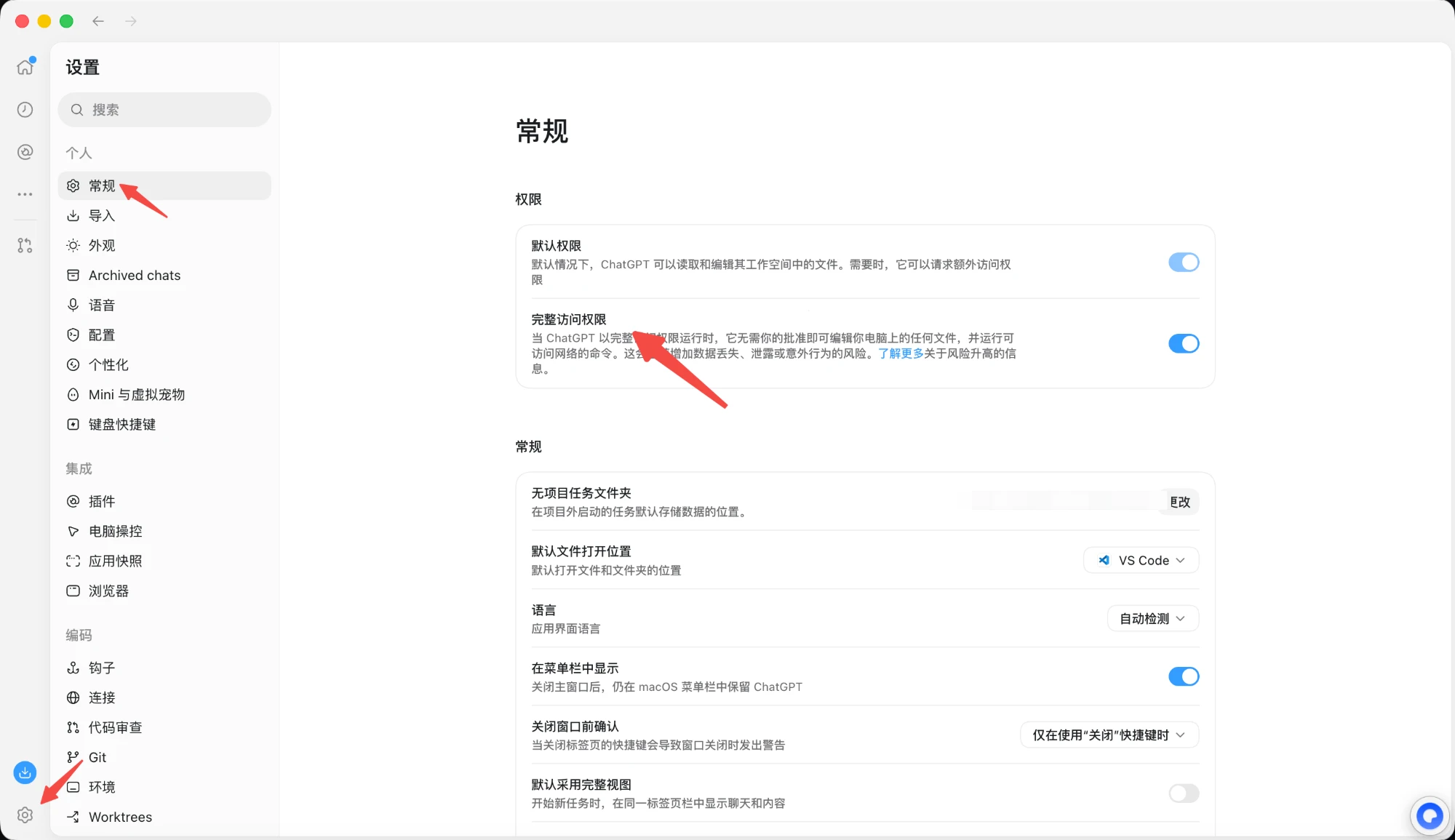
With Full access, Codex no longer asks for approval before it edits files on your computer or runs commands that use the network.
How do I pay?
Image generation draws from the same balance as text models, so you top up once in the console.